
Safari Audio SuperKeys Cubby: A Synth Plugin for Digital Nostalgia

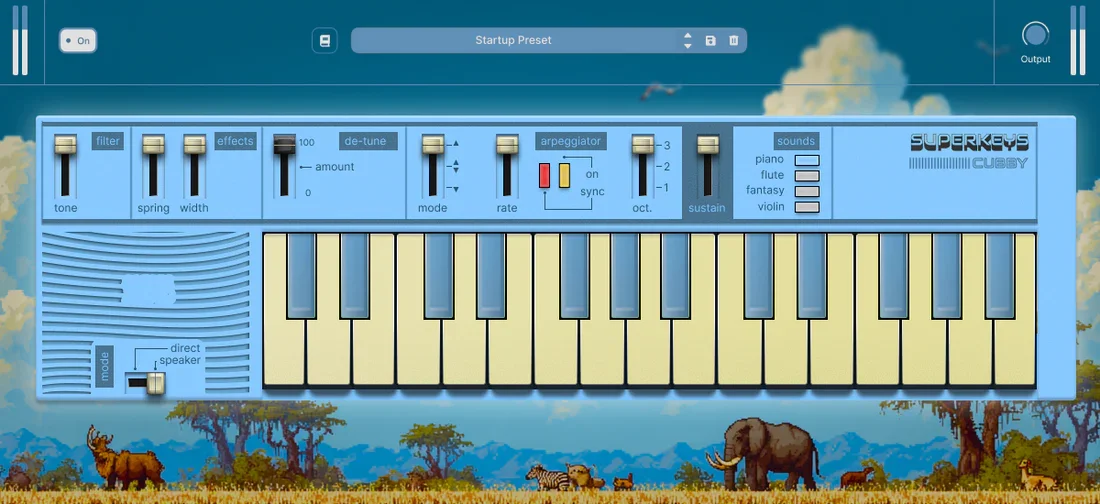
There’s something undeniably charming about old home keyboards — the bright digital piano, the plasticky flute, the dreamy “fantasy” preset that instantly feels like a memory. Safari Audio’s SuperKeys Cubby leans directly into that territory. It doesn’t present itself as a deep workstation or a sprawling ROMpler. Instead, it focuses on a handful of nostalgic tones and gives you just enough control to shape them into something musical and modern. Hinting at thrift store Casios, Cubby centers around four selectable voices — Piano, Flute, Violin, and Fantasy — generated digitally rather than through PCM sample playback. Around those sounds, you get a small set of era-inspired controls, built-in effects, an arpeggiator, and optional speaker emulation. The concept is clear: keep the interface simple, keep the sound vibey, and make it easy to reach for when you want character without distraction.
Ready to capture the lofi charm of nostalgic keys?
Download SuperKeys Cubby here
TL;DR (updated)
Four core digital voices: Piano, Flute, Violin, Fantasy
Dozens of presets built from those engines
Digitally generated tones
Simple controls: Tone, Sustain, De-Tune, Spring, Width
Built-in arpeggiator (3 modes, octave range, sync) + Direct/Speaker output
What It Is
Safari Audio SuperKeys Cubby is a software instrument built around a deliberately narrow idea: classic home-keyboard tones, streamlined into a modern plugin. Rather than offering a deep synthesis architecture or a sprawling multi-gigabyte sample library, Cubby focuses on immediacy. At its foundation are four digitally generated sound engines — Piano, Flute, Violin, and Fantasy — each inspired by the kind of presets found on vintage consumer keyboards.
On top of those four engines sits a preset library, with each patch built from one of the core tones and shaped using Cubby’s built-in controls and effects. Sound-shaping is intentionally minimal: Tone for brightness, Sustain for note length, De-Tune for drift and wobble, and two effects — Spring and Width — plus selectable Direct or Speaker emulation output. An onboard arpeggiator (three modes, octave range selection, and tempo sync) rounds out the feature set. The positioning is clear: Cubby is not about deep programming. It’s about capturing a specific nostalgic digital character and making it easy to deploy inside a DAW.
How It Sounds
Cubby’s character leans unapologetically digital. The Piano has that bright, slightly compact tone associated with small home keyboards — present and clear, but not aiming for acoustic realism. The Flute and Violin carry a synthetic edge that feels intentional rather than accidental; they don’t try to mimic orchestral depth, but instead sit in that nostalgic middle ground where the charm comes from their limitations. The Fantasy voice is arguably the most evocative of the four — airy, slightly glassy, and instantly reminiscent of late-’80s and early-’90s preset culture.
What makes the sound feel alive is how the minimal controls influence it. A touch of De-Tune introduces gentle instability that softens the rigid digital core, while Spring adds a subtle space that can push the tones toward lo-fi or dreamier territory. Engaging Speaker emulation shifts the presentation again, narrowing and coloring the output in a way that reinforces the retro feel. Cubby doesn’t offer huge tonal range or dramatic morphing — its strength is consistency. You reach for it knowing it will deliver a specific flavor: bright, nostalgic, and slightly imperfect in a way that feels human rather than sterile.
Workflow and Real-World Use
Cubby is the kind of instrument you load when you don’t want to think too much. The interface is uncluttered, the sound selection is immediate, and the controls are few enough that you can shape a tone in seconds. Switching between the four core engines is straightforward, and browsing presets feels quick rather than overwhelming. There’s no deep modulation matrix or multi-page editing — which, in practice, means less friction when sketching ideas. You play, adjust Tone or De-Tune, maybe add Spring, and you’re already in usable territory.
The built-in arpeggiator adds another layer of practicality. With three modes, octave range control, and sync, it’s easy to generate movement without reaching for additional MIDI tools. In a real session, Cubby works well as a character layer — doubling a more polished instrument, adding nostalgic texture to modern drums, or sitting quietly in the background of a track that needs something slightly off-center. It doesn’t demand attention through complexity. Instead, it earns its place by being fast, focused, and musically predictable in a reassuring way.
Alternatives to Consider
If Cubby’s appeal lies in its focused retro charm but you want something that leans harder into degradation and texture, Arturia Pure LoFi is a natural step outward. It’s built specifically around nostalgic coloration — noise layers, tape-style wear, speaker simulations, and creative modulation — giving you far more control over how “aged” or unstable a sound becomes. Meanwhile, Arturia SQ80 V approaches vintage digital tone from a different angle: it recreates a classic hybrid wavetable synth with deeper synthesis, layering, and modulation. It’s more complex and capable of sharper, more animated digital textures, though it requires more involvement from the user.
On the lighter, more immediately retro side, miniBit by AudioThing focuses on early 8-bit digital character with a straightforward interface and distinctly crunchy tone. It captures that toy-keyboard energy in a more explicitly chiptune-inspired way. And if what you really want is instant lo-fi mood without worrying about synthesis at all, specialized instruments like Love-Fi Lite 3 by Quiet Music or Lofi Panda 3 by Clark Audio lean heavily into pre-shaped aesthetic presets and baked-in atmosphere. They’re less about shaping a core engine and more about delivering finished vibe quickly. For a deeper breakdown of what to buy instead, check my post about the best lo-fi VST plugins.
Pros
Clear, focused concept built around four nostalgic digital engines
Preset library offers variety without overwhelming the user
Simple controls (Tone, De-Tune, Spring, Width) make shaping fast
Speaker emulation and arpeggiator add usable character and movement
Cons
Limited sound architecture compared to deeper synth plugins
Tonal range stays within a defined retro-digital lane
Minimal modulation and editing options for advanced sound design
Not designed for realistic acoustic instrument emulation
Final Words
SuperKeys Cubby matters because it commits to a very specific idea and doesn’t dilute it. In a landscape full of sprawling, feature-heavy instruments, there’s something refreshing about a plugin that narrows its focus to nostalgic digital tone and executes it cleanly.
It’s best suited for producers who value immediacy, character, and mood over deep programmability. If you want an instrument to disappear into the background of your workflow while still leaving a distinct fingerprint, Cubby makes sense. If you’re looking for a primary workhorse synth with expansive control, you’ll likely want something more flexible.
Disclosure: This site contains affiliate links. If you purchase through these links, I may earn a commission at no extra cost to you.